Basalt
Turn one sample into an instrument.
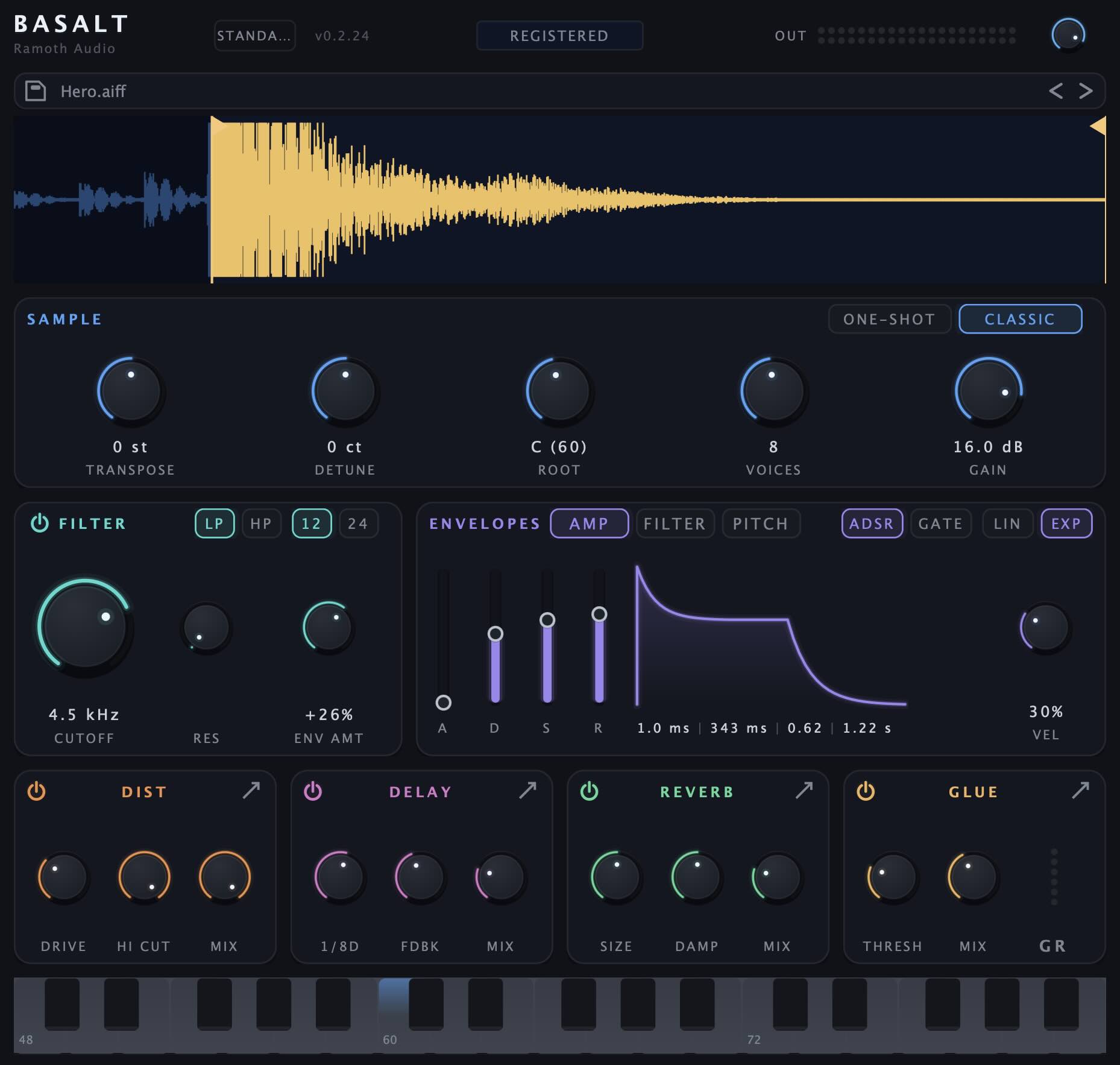
A sampler for your DAW in the classic mold: load a sound, play it chromatically with old-school repitch, then shape it with a per-voice filter, three envelopes, and a built-in FX chain. VST3 & AU.
License terms: Basalt EULA.
macOS — 1.0.0 Windows — 1.0.0System requirements: macOS 11.0 or later · Apple Silicon and Intel (universal binary) · VST3 and Audio Unit · a 64-bit host (Ableton Live, Logic, Reaper, …). Windows (VST3) is in development.
Listen
Loading Basalt demo 1…
Loading Basalt demo 2…
Loading Basalt demo 3…
What it does
One sample, played chromatically
- Classic repitch resampling changes pitch with speed, like hardware samplers.
- No time-stretch or fake artifacts.
- Drag or load a sound in, trim the waveform, and play.
Classic and One-shot playback
- Note-length playback by default.
- One-shot mode always plays to the end of the trim.
- Amp envelope Gate switch for an envelope-free, drum-machine-flat level.
Three envelopes
- Amp, filter, and bipolar pitch envelopes.
- Each is velocity-sensitive with its own amount.
- Switch each between linear and exponential curves.
A filter per voice
- State-variable low-pass/high-pass at 12 or 24 dB per octave.
- Dedicated envelope per voice.
- Resonance capped below self-oscillation.
Distortion
- Boost, Tube, Fuzz, and Square shaper modes.
- Drive, high-cut, and mix controls.
- 2× oversampling, with a 4× option.
- Anti-mud low-cut in the detail view.
Character delay
- Tempo-synced stereo or ping-pong delay.
- Feedback filters and modulation.
- 12-bit converter inside the loop.
Reverb, tight to ambient
- Hardware-inspired reverb voiced for instruments.
- Size, predelay, and width controls.
- Damp sweeps the whole tank from bright to dark.
Glue on the way out
- Bus-style compressor.
- Stepped ratio and attack, plus auto release.
- Parallel mix and a gain-reduction meter.
Why Basalt
Made by musicians, for musicians.
We made Basalt for the moment when a sample has the right notes but not the right feel. It is an opinionated instrument, shaped by musicians for musicians: classic repitch at the core, with a focused set of tools for adding grit, character, and depth.
Every choice is intentional. We left out anything that gets between the musician and the sound, so you can start clean and precise, then shape the character exactly where you want it.
FAQ
What are the demo’s limitations?
Just one: a quiet white-noise wash (about two seconds, faded in and out) plays every 75 seconds until a license is entered. Nothing else is restricted — all parameters, all effects, saving and reloading all work. Projects you make with the demo open unchanged once you buy.
How does the license work?
You get a name and a key. Enter them once in the plugin and every Basalt instance for your user account unlocks — VST3 and AU alike. Verification is fully offline: no account to create, no activation server to depend on, no dongle.
Which formats and systems are supported?
VST3 and Audio Unit on macOS 11.0 or later, as a universal binary for both Apple Silicon and Intel. A Windows VST3 build is in development. 64-bit hosts only.
How many computers can I install it on?
All the machines you personally use — studio machine, laptop, the works. The license is per person, not per computer.
Do I need an internet connection?
Only to download the installer. Licensing is offline, the plugin never phones home, and its Updates button simply opens this page in your browser.
Does Basalt time-stretch?
No — and that’s deliberate. Basalt repitches: playing higher speeds the sample up, playing lower slows it down, exactly like classic hardware. That coupling of pitch and time is the sound.
Are updates free?
Yes — every 1.x release is a free update for license holders. Grab the latest installer from this page and run it; your license and projects are untouched.
What about refunds?
Try the demo first — it’s the full plugin, so there are no surprises after purchase. If something’s wrong anyway, write to support@ramothaudio.com and we’ll sort it out. Checkout and refund processing are handled by FastSpring, our merchant of record. See our Refund Policy for details.
Updates
Latest version: not yet released
This page is Basalt’s update check. The Updates button in the plugin opens it with your installed version in the address; if a newer build is out, a banner at the top of the page says so. To update, grab the latest installer from the download buttons at the top and run it — it replaces the plugin in place, and your license, settings, and projects are untouched.